Which one fits your team?

Choose n8n
When technical ownership, code steps or self-hosting are important.

Choose Zapier
When managed app connections and simpler operator maintenance are the priority.
n8n cloud executions and Zapier tasks count different things. Price a complete run and test recovery after a failed step.
The differences that matter
| Decision | n8n | Zapier |
|---|---|---|
| Primary scope | Workflow automation | App workflow automation |
| Shortlist when | Technical ownership, code steps or self-hosting are important. | Managed app connections and simpler operator maintenance are the priority. |
| Buying model | Starter: €20/month · annual commitment | Professional · starting offer: $29.99/month · monthly billing |
| Confirm before purchase | Are you paying for cloud executions, an enterprise edition, or your own hosting and operations? | Which actions count as tasks, and are the apps you need available on the plan? |
n8n: where it fits
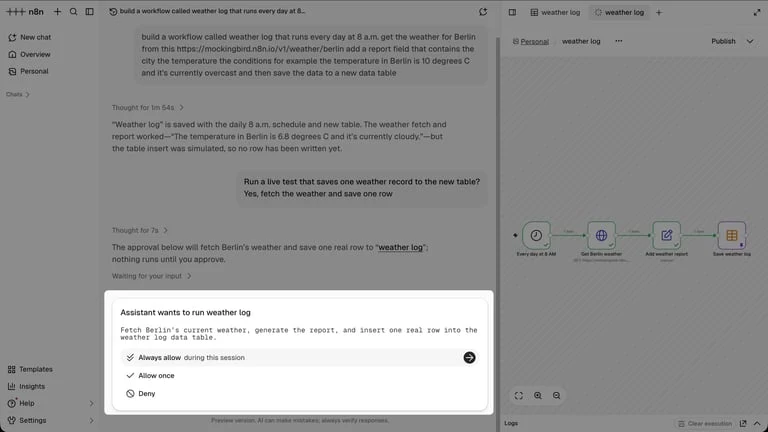
n8n is a workflow platform that combines a visual execution graph with code-capable steps. It can be used as a hosted service or operated on your own infrastructure. GTM use cases include incoming lead validation, enrichment, routing and CRM updates, with the workflow owner responsible for the behavior between connected systems.
Capabilities to compare:
- Visual workflow editor
- Code steps
- API and application connections
- AI-agent workflows
- Cloud and self-hosted editions
Tradeoff: Cloud execution billing and self-hosted operating cost require different budgets. The Community edition does not include every paid-edition feature, and self-hosting still requires backups, upgrades and monitoring. Check the license and edition for the intended use.
In an evaluation: Build a lead-intake flow with validation, a durable deduplication check and a CRM write. Deliberately fail the external API step, inspect the run and recover it without creating a duplicate record or paying twice for a completed lookup.
The pricing record separates billing periods, allowances and source dates. Use that configuration in the cost comparison rather than combining a monthly seat price with a different product’s annual rate.
Zapier: where it fits
ZapierCount the successful tasks in the full automation.
Zapier is a managed automation platform connecting applications, workflows and AI-agent capabilities. Its current pricing groups Zaps with Tables and Forms, so the buying comparison should identify both the workflow actions and the supporting data or intake features the team needs.
Capabilities to compare:
- Application-connected automations
- Multi-step workflows
- Tables
- Forms
- AI-agent and governance capabilities
Tradeoff: Several successful actions can consume several tasks for one input record. Confirm task-count rules, the required apps, collaboration features and overage handling on the selected tier. A large integration catalog does not prove support for every action your flow needs.
In an evaluation: Connect the exact applications and operations in the intended process. Trigger a real test event, inspect the tasks charged and test an error or duplicate. Confirm that an operator can update credentials and maintain the automation.
Questions buyers ask
A useful evaluation
n8n cloud executions and Zapier tasks count different things. Price a complete run and test recovery after a failed step.
Use the same inputs and record the purchased edition, charges, output statuses and manual work. Save the export and a failed-run example so the future owner can inspect the result.