Which one fits your team?

Choose Clay
When you want to build and maintain the enrichment sequence and its surrounding logic.
Choose FullEnrich
When you want to send records to a managed waterfall supplier.
Keep orchestration fees separate from the data-provider bill and compare identical inputs.
The differences that matter
| Decision | Clay | FullEnrich |
|---|---|---|
| Primary scope | Enrichment orchestration | Waterfall enrichment |
| Shortlist when | You want to build and maintain the enrichment sequence and its surrounding logic. | You want to send records to a managed waterfall supplier. |
| Buying model | Launch (headline, entry tier): $185/month · monthly billing | Pro (1,000 credits/mo tier): $55/month · monthly billing |
| Confirm before purchase | Which steps use Clay credits, and which bill your own provider account? | What happens to credits when the waterfall finds nothing or returns an existing address? |
Clay: where it fits
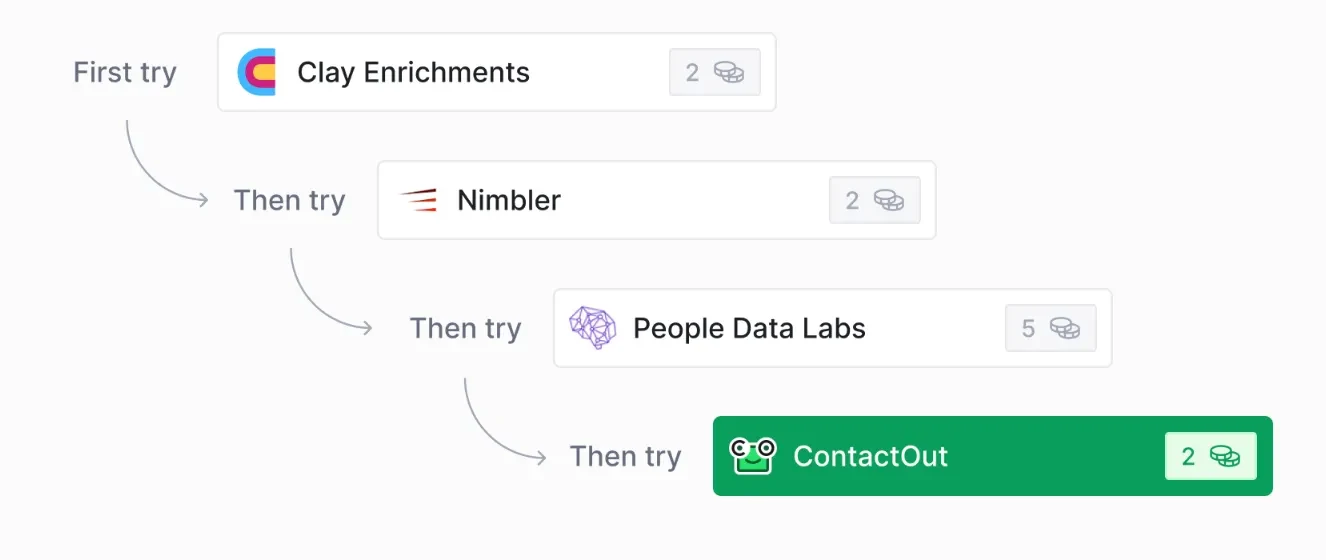
Clay is an orchestration and data workspace for GTM teams. It combines access to data providers with research and workflow execution. The central operating decision is how a record moves through the table or workflow: which provider runs, what happens on a miss and what is written to the destination system.
Capabilities to compare:
- Data-provider marketplace
- Enrichment workflows
- AI-assisted research
- Visual GTM workflow building
- Bring-your-own provider keys
Tradeoff: Clay actions and data credits are separate cost drivers. Bringing a provider key can move the data charge to that supplier while retaining Clay action consumption. A full record can invoke multiple steps, so calculate costs from the actual workflow.
In an evaluation: Build a small enrichment flow with a known input list, an acceptance rule and a fallback provider. Record the action count, data credits and external charges, then test a timeout and a replay before increasing volume.
We priced Clay in July 2026 for a weekly signal feed and ended up building it ourselves, mostly because our best signal was a competitor's product name inside job-post text, and Clay's job search sat outside its public API at the time. That limit won't touch a team buying contact enrichment, which is what FullEnrich sells. The billing will. In Clay's July 2026 docs an email hit from a built-in provider cost 1 action and 0.5 data credits, and a full person record 6 to 20 credits, so price the fields you need before you compare a per-contact rate.
The pricing record separates billing periods, allowances and source dates. Use that configuration in the cost comparison rather than combining a monthly seat price with a different product’s annual rate.
FullEnrich: where it fits
Measure the additional accepted records from the waterfall.
FullEnrich sits between your prospect list and a group of contact-data vendors. You give it a name and company, a list from its search, a HubSpot list, or a CSV or Excel file. It then queries providers one after another until it finds an email or phone number. The homepage says it pulls from 20+ premium vendors . The plan comparison table on the pricing page says 25+ sources. The provider logos it shows include Clearbit, Wiza, ContactOut, Anymail Finder, Snov and Hunter. FullEnrich says it picks vendors based on where each lead is located.
The bigger difference is the filtering after the lookup. FullEnrich claims that 31.53% of the data it buys fails its verification, and that you neither receive nor pay for that data. Emails go through three verification engines, and one disagreement drops the address. FullEnrich says it resolves catch-all domains instead of flagging them as risky, and its pricing table claims 80% of catch-alls get verified. Each email it delivers carries a bounce probability. Phone numbers are checked against the carrier network, and dead lines are removed. Landlines are returned free. The check that the line belongs to the named person applies only in the US and Canada.
The pricing page lists a HubSpot integration that can push contacts and companies and enrich records already in HubSpot. A version that runs inside HubSpot is marked "Soon". The page also mentions CRM integrations and no-code integration in general terms, but HubSpot is the only CRM named in the sources. The MCP server, all three APIs and bulk CSV enrichment come with Pro. Custom rate limits and concurrency are Enterprise-only, and no default API limits are published. If you plan to call the API heavily, ask for those limits before you sign.
The pricing record separates billing periods, allowances and source dates. Use that configuration in the cost comparison rather than combining a monthly seat price with a different product’s annual rate.
Questions buyers ask
A useful evaluation
Keep orchestration fees separate from the data-provider bill and compare identical inputs.
Use the same inputs and record the purchased edition, charges, output statuses and manual work. Save the export and a failed-run example so the future owner can inspect the result.