n8n is the best fit for technical GTM teams that want long flows at a per-run price, Zapier for non-technical owners who need the widest connector list, and Make for branch-heavy scenarios. Clay and Databar belong beside them when enrichment is most of the work, and Cargo when the team already reviews code.
Your shortlist
Editorial selectionThese products cover different parts of this job. Use the fit and buying model to decide which belong in your evaluation; display order is not a performance ranking.

Engineers who want a visual workflow with code steps and a self-hosting option.
Read profile →Operators building connected scenarios in a visual builder.
Read profile →Teams prioritizing packaged app connections and straightforward workflow maintenance.
Professional · starting offer: $29.99/month · monthly billing
Vendor source ↗Pricing read 2026-11-12 · USD
GTM engineers combining data providers, research and enrichment in one workflow.
Launch (headline, entry tier): $185/month · monthly billing
Vendor source ↗Pricing read 2026-11-09 · USDGTM engineers who want to keep TypeScript workflows in a repository while a service runs them.
Read profile →Teams evaluating a workspace, API and MCP access to multiple data providers.
Read profile →Most teams compare automation tools by plan price and find the real bill later, when a flow loops through a contact list or an enrichment provider starts timing out. The six products here fall into three shapes, and the shape decides two things that matter more than the headline price: who on your team can open a failed run and fix it, and what one completed record costs. We priced Clay and n8n for our own signal and enrichment jobs in 2026 and ran those jobs as our own scheduled scripts; the rest of this guide is from each vendor's product and pricing pages.
Three product shapes
| Shape | Products | Where the workflow lives | Who usually repairs it | Billing unit |
|---|---|---|---|---|
| App-to-app automation | n8n, Make, Zapier | A visual canvas of triggers and steps | An ops builder or technical marketer; an engineer for code steps | n8n execution, Make credit, Zapier task |
| Data workspace | Clay, Databar | Tables of accounts and contacts with enrichment columns, plus flows | The GTM engineer or RevOps analyst who owns the data | Clay actions plus data credits; Databar credits |
| Code-first runtime | Cargo | TypeScript files in a repository you own | An engineer or coding agent, through pull requests | Cargo credits across tools, steps, tokens, storage and hosting |
The app-to-app tools are general-purpose. GTM is one of many things they do. You connect your CRM, form tool, Slack and enrichment providers yourself and pay those providers separately.
The data workspaces start from rows of companies and people. They sell access to many data providers under one contract, run waterfalls across them and add automation around the table.
Cargo treats GTM logic as software. A coding agent writes the workflow in a repository, a person reviews the change, and Cargo runs it in production with retries, rate limits and per-run traces.
Pick the shape your team can maintain. A flow a RevOps manager can repair in the morning without filing a ticket is worth more than a cleverer one nobody on the team can read.
Draw one real flow before you compare plans
Pick the flow you would build first and write it down step by step. For many teams it looks like inbound lead routing:
- Trigger: a demo form submission or a new CRM contact.
- Company enrichment: a waterfall that tries up to three providers until one returns firmographics.
- Contact enrichment: find a work email, sometimes a phone number.
- AI step: score the lead against your ICP.
- Branch: enterprise path or SMB path.
- Writes: update the CRM owner and fields, which are two writes.
- Notify: post to the assigned rep in Slack.
- Retries: at least one retry when a provider rate-limits or times out.
Now multiply by realistic volume. At 2,000 inbound leads a month, a flow that costs eight units per lead needs 16,000 units before retries. A flow that iterates over 20 contacts per account multiplies again. List loops are where per-action billing surprises people.
How the same lead is metered
| Product | Billing unit | The example lead above | What changes the count |
|---|---|---|---|
| n8n | One execution per complete workflow run | 1 execution, whatever the step count | Provider fees are billed by each provider; concurrency and run-time caps vary by plan |
| Make | Credits per module action | About 8 credits if all three providers run; the router is free | AI Provider steps can cost more; iterators and loops multiply actions |
| Zapier | Tasks per step and per external connector call | At least one task per step that runs | AI model tier, code runtime and connector type change the rate |
| Clay | Actions for platform work, data credits for marketplace data | An action per enrichment and per waterfall step, plus data credits for found values | No result means no charge; your own key removes data credits but keeps the action |
| Databar | Credits per successful request on Databar's provider keys | Credits only where Databar's keys return data | Your own keys and custom APIs use no credits |
| Cargo | Credits across tools, steps, AI tokens, records and hosting | Each tool's listed price, plus 1 credit per 100 workflow steps and AI tokens | Mailboxes and hosted apps draw credits every month |
The Make figure assumes one credit each for the trigger read, three provider modules, the AI step, two CRM writes and the Slack post. That is a counting illustration rather than a quote. Your real number depends on modules and AI usage. The n8n figure looks cheapest, but it excludes the bills from the enrichment providers you connect. Clay, Databar and Cargo fold provider data into their own credits.
Choose where a failed run gets repaired
GTM workflows break in ordinary ways. A provider changes a field name, a CRM picklist value disappears, or an AI step returns malformed output. What matters is how quickly the owner can see which record failed, at which step, and fix it without re-running the whole batch.
| Product | What the owner sees on failure | Recovery tools | Change history |
|---|---|---|---|
| n8n | Execution logs on the canvas; log retention of 7 days on Starter, 30 on Pro | Re-run only the broken step, error workflows, automatic retries, replay or mock data | Workflow history on Pro; Git version control on Business and Enterprise |
| Make | Real-time visual execution monitoring and searchable execution history | Free error-handler modules; incomplete executions are stored | Log retention varies by plan |
| Zapier | Run logs; Enterprise adds observability | Plan table lists autoreplay, custom error settings and alerts; Next Gen Zaps add an AI manager agent (early access) | Versions and version compare |
| Clay | The table row and the canvas show which column or step returned nothing | Re-run cells or rows; no-result enrichments are not charged | Plan-level detail not published on the pricing page |
| Databar | The table row shows each waterfall provider's result | Failed or empty requests are not charged | Not detailed on the pricing page |
| Cargo | Step-by-step trace per run, with each output and its cost; alerts | Automatic retries and rate limiting; workflows pause rather than lose data when credits run out | Every play and agent versioned, with diffs and rollback |
The failures that don't show up as failures
The failures that cost us most were runs that looked successful. A paid job-data API returned HTTP 402 when our balance ran out, our script read it as "no results", and 103 of 105 seed companies came back empty. Our reply watcher ran on a laptop cron, stopped after five days and wrote 2,422 log lines of the same error that nobody read. A weekly poller stopped the same way. None of the tools above would have caught these by default either, because each run either "succeeded" or failed somewhere nobody was looking. Whichever tool you pick, set three things up on day one:
- Treat any non-200 response as a failure, and never let an error become an empty result.
- Compare each run's output count with the last one, and alert when it drops to zero.
- Send failure alerts to a channel someone reads, and alert when a scheduled job hasn't run.
We moved our jobs off the laptop to a small server, budgeted at about $6 a month including Postgres, with GitHub Actions as a fallback. The n8n cloud vs self-hosted write-up covers that choice in more detail.
The picks
n8n
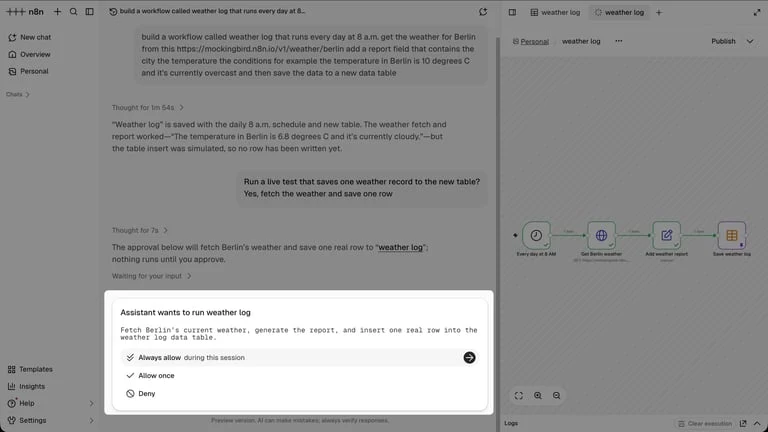
n8n is a visual workflow builder that lets you drop into JavaScript or Python steps when the canvas is not enough. It lists more than 500 native integrations, connects to any API over HTTP and supports MCP for agents and coding assistants. You can use the hosted cloud or self-host with Docker. A self-hosted Community Edition is on GitHub. For GTM, the relevant pieces are the AI agent node with structured inputs and outputs, human approval for tool calls (for example, asking a rep in Slack before an action runs) and webhook and queue triggers. Full vendor detail is on the n8n profile.
The billing model is the main reason GTM engineers choose it. n8n's pricing counts one execution per complete workflow run, regardless of how many steps it contains. All plans include unlimited users, unlimited workflows and every integration. A 15-step enrichment and routing flow costs the same as a two-step one. That reverses the incentive you get from per-action tools: you can add validation, logging and fallback branches without paying per step.
The plan limits, captured on 10 November in euros and billed annually (monthly-billing prices were not captured):
- Starter, €20 a month: 2,500 executions, 5 concurrent executions, 1 shared project, a 5-minute maximum execution time and 7 days of execution logs. Cloud only.
- Pro, €50 a month: 10,000 executions, up to 50 concurrent, 3 shared projects, a 40-minute maximum run, 30 days of logs, workflow history and search of executions by the data they contain.
- Business, €667 a month: 40,000 executions on a self-hosted edition only. It adds SSO and LDAP, multiple environments, queue mode for scaling and Git version control. Companies under 20 employees may qualify for a Startup plan at half the Business price.
- Enterprise: custom executions, hosted or self-hosted, with log streaming, audit logging, an external secret store and SLA support.
- Community Edition: free, self-hosted. Custom nodes and bash scripts are available in self-hosted setups.
See n8n pricing for the full plan breakdown.
Strengths: per-run billing, real code steps on every plan, automatic retries and error workflows on every plan, and the option to keep data in your own environment. Re-running only the failed step is a practical advantage when one provider call in a long chain breaks.
Limitations: the governance features that teams of several builders need, such as Git, environments, audit logs and log streaming, sit on Business and Enterprise. Business is self-hosted, so it also brings server and on-call costs. The 5-minute run cap on Starter can be tight for flows that wait on slow AI or multi-provider waterfalls. n8n has no data marketplace. You hold and pay every enrichment contract yourself, and those costs never appear in the execution count.
We priced n8n for our own jobs and kept running them as scripts, so we haven't used it hands-on.
Verdict: the strongest general automation choice for a technical GTM team that wants long, well-instrumented flows at a predictable per-run price and is comfortable managing provider accounts. Budget for Business-level features, or for running self-hosted, once more than one person edits production workflows.
Make
 Make
Count branches and actions across a complete scenario.
Make builds scenarios on a visual canvas, by drag-and-drop, by prompting, or from an AI chat through its MCP server. It lists more than 3,500 apps out of the box. You can add custom integrations to anything with a public API, run JavaScript or Python, and manage the platform itself through more than 300 REST API endpoints. Make states GDPR compliance and SOC 2 Type II and SOC 3 certification. The Make profile has more.
Make changed its billing unit to credits on 27 August. On Make's pricing page, most module actions cost one credit: reading a record, searching, creating, updating, deleting, transforming, aggregating or iterating. Some AI Provider features cost more. Router modules and error handlers (rollback, break, resume, commit, ignore) are free. A scenario can use anywhere from two credits to thousands in a single run.
Operational terms worth knowing:
- The free plan includes 1,000 credits a month.
- Extra credits come in bundles of 1,000 or 10,000 at your plan's fixed rate. Core, Pro and Teams can auto-purchase 10,000 before you run out.
- Credits expire at the end of the term. Extra credits last a month on monthly billing and a year on annual Pro and Teams.
- Usage allowances scale with credits. Every 10,000 credits brings 5 GB of data transfer, 10 MB of storage and a 667-webhook queue, up to a 10,000-webhook maximum.
- When credits run out, scenarios stop. Incoming webhooks queue up to that limit, and polling scenarios pick up from their last successful run.
- Downgrading stops any active scenario that uses higher-plan features.
Plan prices were not in the captured page text. Make says annual payment is cheaper than monthly and offers a Start-up Plan at half the Business price for companies under 20 employees.
Strengths: free routers make branching cheap. The visual monitor suits operators who think in modules. Breadth of apps and custom-app support cover most CRM and outreach stacks.
Limitations: per-action billing punishes iteration. Enriching 30 contacts per account means 30 passes through every module in the loop. The webhook queue is tied to credit volume, so a small plan can drop a burst of inbound leads if credits hit zero during a campaign.
Verdict: a good fit for ops-led teams building short-to-medium scenarios with lots of branching. Model the loops before you commit, and size credits for your peak inbound week, not your average one.
Zapier
 Zapier
Count the successful tasks in the full automation.
Zapier has the widest packaged catalogue here. It lists 9,000+ apps and more than 66,000 triggers and actions. Beyond Zaps, the platform includes Tables, Forms, Canvas for mapping workflows, Agents, Chatbots, an MCP connection for AI tools and an SDK for coding agents. Next Gen Zaps, in early access, add an AI manager agent that Zapier says detects and fixes issues. Zapier's Fluid Determinism approach moves repeat AI work into fixed steps to reduce token use. Zapier states SOC 2 Type II, SOC 3, GDPR and CCPA compliance. See the Zapier profile.
On Zapier's pricing page, every Zap step and every external connector call uses tasks. The rate depends on AI model tier, code runtime and connector type. Tasks form one pool shared across Zaps, AI steps, code, MCP and SDK.
Plan differences that affect GTM work:
- Free: 100 tasks a month, two-step Zaps only, 15-minute polling, 1 second of code runtime per step, 2,500 table records.
- Professional: multi-step Zaps, premium apps, webhooks, AI fields, 2-minute polling, 30 seconds of code runtime, 100,000 table records. One seat.
- Team: 25 seats, shared Zaps, folders and app connections, SAML SSO, priority support, 1-minute polling, 500,000 records.
- Enterprise: unlimited users, advanced admin and app controls, annual task limits, observability, 2 minutes of code runtime per step.
The captured page showed Professional starting at $19.99 a month and Team at $69 a month in USD. The capture does not establish which side of the monthly or yearly toggle those figures came from, and the price rises with the task tier you select (tiers run from 100 to 2 million tasks a month). Paying yearly is advertised as 33% cheaper.
Strengths: the person who owns a SaaS app can usually find its connector and maintain the Zap themselves. Team's shared connections stop flows breaking when one employee's login expires.
Limitations: per-step tasks add up quickly on enrichment chains. Polling intervals matter for speed-to-lead: 15 minutes on Free, and still 1 minute on Team, so use webhook triggers where response time matters. Professional is a single seat, which suits a solo operator but not a RevOps team.
Verdict: the safest pick when connector coverage and non-technical maintenance matter most. It is a weaker fit for heavy enrichment loops, which are often cheaper in a data workspace feeding a short Zap.
Clay
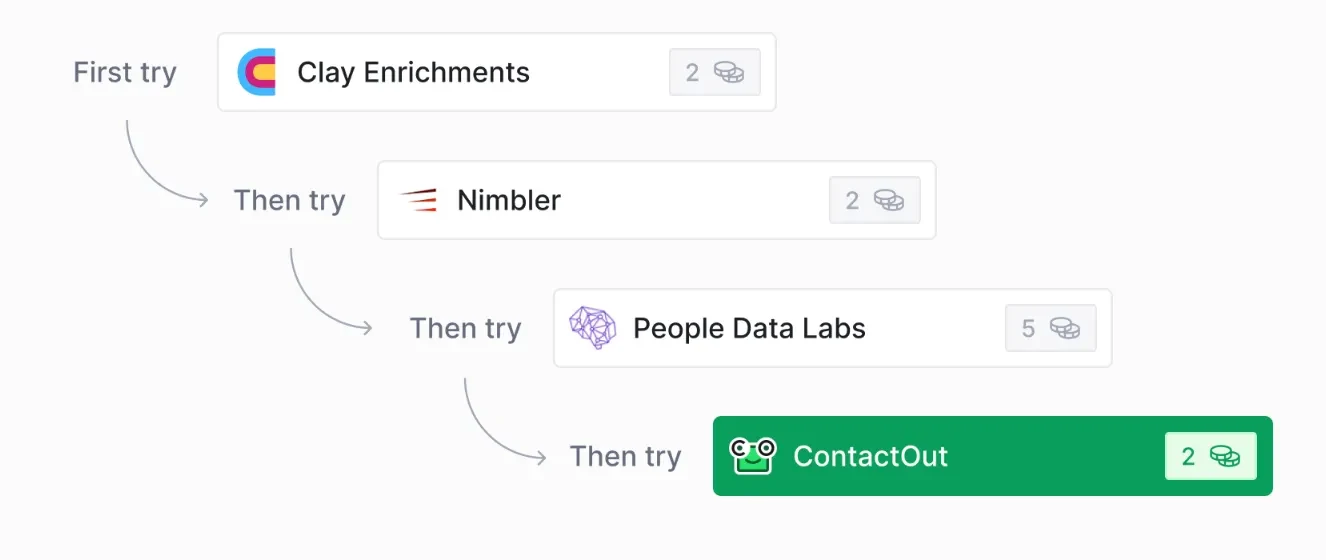
Clay is a GTM data workspace. Its marketplace sells data from many providers under one contract: the pricing page counts 150+ data partners, and the homepage cites 200+ data and AI vendors. Other features include waterfall enrichment across providers, Claygent AI research, job-change and signal tracking, a native sequencer, ad-audience syncs and CRM enrichment, all on a visual canvas you can build by clicks, code or chat. The product menu also lists a CLI and API for building from a coding agent. See the Clay profile.
Clay charges two meters. Actions cover platform work: running an enrichment, a table, an AI call or an export. Data credits cover the data bought from the marketplace. Key rules from Clay's pricing page and its actions and data credits guide:
- Data credits start at $0.05 each, and actions at under a cent, both getting cheaper at scale.
- An enrichment that returns nothing costs neither actions nor data credits.
- With your own provider API key, each run still counts as one action but uses no data credit.
- Each waterfall step counts as an action, whichever provider it calls.
- The docs give a work email example at 0.5 data credits per email, and say a fully enriched record typically costs 6 to 20 data credits.
- Actions reset each cycle. Data credits roll over on Launch and Growth up to twice the monthly amount. Top-ups cost 30% more.
Plans, in USD:
- Free: 500 actions and 100 data credits a month, unlimited seats, 200 rows per table, no phone enrichment.
- Launch: $167 a month billed annually ($54 for 180,000 actions a year plus $113 for 30,000 data credits a year) or $185 billed monthly (15,000 actions and 2,500 data credits a month). Adds phone enrichment, signal tracking, email campaign integrations and 50,000 rows per table.
- Growth: $446 a month annually ($185 plus $261) or $495 monthly, with 40,000 actions and 6,000 data credits a month. Adds CRM auto-sync, HTTP API integrations, webhook automation, web intent signals and priority support.
- Enterprise: custom annual pricing, with Clay API access, data warehouse syncs, SSO and RBAC.
Launch and Growth include a 14-day trial. Full tiers are on Clay pricing.
We priced Clay for a weekly signal feed in July 2026 and didn't trial it. Job-change tracking on about 8,000 people, news on about 400 accounts a week and about 260 emails a month came to roughly 35,300 actions and 9,850 data credits, about $610 a month, and we put the realistic range at $500 to $700. The same feed run monthly was about $350, and daily went past $2,665. Cadence moved the bill more than plan choice did, so price the refresh rate you need before the tier.
Strengths: one contract replaces several provider subscriptions, misses are free, and the table shows which row and column failed. For TAM building, CRM enrichment and outbound research, the workspace is the workflow.
Limitations: two meters are harder to forecast, and actions don't roll over. Some signals aren't in the marketplace at all; we wanted to know when a target account posted a job naming a competitor and built that ourselves from public job boards, as the hiring signals write-up describes. Webhooks and CRM auto-sync start on Growth, so always-on inbound automation means budgeting at least $446 a month annually. Growth's HTTP API integrations call other services from your tables; the pricing page lists Clay API access as an Enterprise item, so confirm which access your build needs. Per-action costs for phone and individual providers are not published on the pricing page.
Verdict: the default for GTM engineers whose work is mostly enrichment, research and list building. Pair it with a lighter automation tool for cross-app plumbing rather than forcing every integration through Clay.
Databar
 DatabarPublished capabilities
- People and company discovery
- Multi-provider enrichment
- Research workflows
Which providers and output fields consume each type of credit?
Check product scope ↗Databar offers a similar data-first shape with one meter. It provides a spreadsheet-style workspace, a REST API, an SDK and CLI, and a hosted MCP server. A waterfall tries provider after provider until one returns a verified result. An AI researcher reads the live web and returns structured columns with citations. Flows support triggers, schedules, if/else branches and AI steps. Integrations include two-way sync with HubSpot, Pipedrive and Attio, and pushes to Salesforce, Close and outreach tools. The site cites 100+ providers in some places and 160+ in others. See the Databar profile.
Billing, from Databar's pricing page:
- Free: $0 with 150 credits.
- Build: $99 a month billed monthly, 5,000 credits a month, MCP and CLI access, CRM integrations, your own API keys and webhooks.
- Scale: $495 a month billed monthly, 50,000 credits a month, a workspace cache so repeat lookups aren't re-billed, a faster queue and a dedicated Slack channel.
- Enterprise: custom credits, a dedicated GTM engineer, dedicated infrastructure and white-label options.
- Annual billing saves 12% and delivers all 12 months of credits upfront.
Credits apply only when Databar's own keys reach a provider. Your own keys and custom APIs are free on every plan. Failed or empty requests are not charged. Unused credits roll over one billing period. Databar has retired its separate actions meter. Workspace editors are capped at 1, 3 and 10 on Free, Build and Scale, with unlimited on Enterprise. A 14-day premium trial needs no card.
Strengths: the simplest enrichment meter here, and the best economics if you already hold provider contracts, since your own keys cost nothing. Free search previews let you size a list before spending.
Limitations: per-provider credit rates are not on the pricing page. The workspace cache is a Scale feature, so Build can pay twice for the same lookup. Three editors on Build will pinch an agency with several client operators.
Verdict: a strong value pick for founders and agencies who want waterfall enrichment, API and MCP access on one simple meter. Test the specific providers and fields you need before assuming coverage matches a larger marketplace.
Cargo
 CargoPublished capabilities
- Repository-owned TypeScript workflows
- Production execution
- Retries
Which runtime limits, retries and provider costs are included?
Check product scope ↗Cargo now presents itself as GTM infrastructure for coding agents. A coding agent writes your GTM logic in TypeScript in a repository you own, organized into context, data models, tools, agents and plays. A pull request shows what will change, merging deploys it, and earlier versions are kept for rollback. Agents can read run logs and propose changes, but nothing goes live without approval. Other building blocks include territories synced from your CRM, warmed-up mailboxes, internal apps for reps, and traces of every run showing each step's output and cost. Cargo states SOC 2 Type II certification, SSO and a choice of data region. See the Cargo profile.
Cargo's pricing uses one credit pool:
- Tools and actions cost whatever the interface shows for each.
- AI agents are billed in model tokens, per 1,000 tokens at each model's rate.
- 100 workflow steps cost 1 credit, and 1,000 saved records cost 1 credit.
- Hosting costs 50 credits a month per app, 15 per worker and 10 per custom domain, plus 1 credit per 10,000 requests or analytics events.
- Mailboxes cost 100 to 160 credits a month each.
Every plan includes agents, workflows, data models and 150+ integrations. Plans differ in credits, support and SSO. Captured starting prices in USD were $0 (100 free credits in the first month), $165 for 1,500 credits, $250 for 2,500, $1,190 for 17,000 and $3,000 for 50,000+. The capture does not show whether those figures were the monthly or yearly toggle. Optional human help costs extra: Advisory at $2,000 a month (3-month term, billed upfront), Co-build at $4,000 a month (6 months) and Managed from $10,000 a month (12 months). When credits run out, workflows pause without losing data. Paid plans carry a 14-day refund window.
Strengths: repairs happen through code review, with traces that show which step failed and what it cost. Cargo says data providers are included in its one bill, which reduces provider sprawl. The managed tiers let a team start with Cargo engineers and take over the same repository later.
Limitations: someone has to read and approve TypeScript pull requests, and that is a real staffing requirement. Per-tool credit prices appear in the product rather than on the pricing page, so the 1,500-credit tier is hard to size in advance. Mailboxes alone can take a large share of it.
Verdict: the best fit for teams that already run engineering practices on GTM and want production guarantees (retries, rate limits, versioning, traces) without building that runtime themselves. It is a poor fit if nobody on the team will review code.
Side-by-side pricing shape
| Product | Entry paid plan as captured | Currency and billing | Free option | One unit covers |
|---|---|---|---|---|
| n8n | Starter €20/mo, 2,500 executions | EUR, billed annually; monthly not captured | Self-hosted Community Edition; cloud trial with no card | A whole workflow run |
| Make | Prices not in captured text | Annual cheaper than monthly | Free plan, 1,000 credits/mo | Most module actions |
| Zapier | Professional from $19.99/mo | USD; toggle state not established | Free, 100 tasks/mo, two-step Zaps | A step or connector call |
| Clay | Launch $167/mo annual or $185 monthly | USD | 500 actions + 100 data credits/mo | Platform action plus data credits |
| Databar | Build $99/mo, 5,000 credits | USD, billed monthly; annual saves 12% | 150 credits | A successful request on Databar's keys |
| Cargo | From $165/mo, 1,500 credits | USD; toggle state not established | 100 credits in the first month | Tools, steps, tokens, records, hosting |
| Capability | n8n | Make | Zapier | Clay | Databar | Cargo |
|---|---|---|---|---|---|---|
| Self-hosting | Yes | No | No | No | No | No (data region choice) |
| Code steps | JS/Python, all plans | JS/Python | Code by Zapier, runtime capped by plan | Code on canvas | API, SDK, CLI | TypeScript repo |
| Built-in data marketplace | No | No | AI enrichment in Tables | Yes | Yes | Providers included |
| MCP | Client and server trigger | MCP server | Zapier MCP | Listed | Hosted MCP server | Listed |
| Git-style versioning | Business and Enterprise | Not stated | Versions and compare | Not stated | Not stated | PR review, diffs, rollback |
Which tool fits which buyer
GTM engineer at a technical company. Use Clay or Databar for enrichment depth and n8n for cross-app flows. Choose Cargo instead if your team already reviews code and wants one production runtime with traces and rollback.
RevOps lead without engineering support. Zapier Team gives shared connections and SSO with the least code. Make suits a builder who thinks in branches and wants cheaper routing. Add Clay Growth only if inbound enrichment needs webhooks and CRM auto-sync.
Founder doing GTM alone. Start with Databar Build or Clay Free for lists and enrichment, and n8n Starter or Zapier Professional for the few flows that must run unattended. Keep it to one paid enrichment meter until volume is proven.
Agency running several clients. Watch seats and editors. n8n has unlimited users, Databar Build allows three editors, Zapier Professional is one seat, and Clay has unlimited seats on Free. Per-client separation also matters: n8n's shared projects (1, 3, then 6 on Business) and Databar's custom credit options on Enterprise are the relevant levers.
Running two tools without paying twice
The common stack is a data workspace for enrichment plus an automation tool for plumbing. The risk is double metering. A Zapier step calls Clay, Clay charges an action and data credits, and Clay's webhook triggers another Zap step. Draw the boundary on your flow diagram. Let the data tool own every provider call and retry, and let the automation tool own triggers, CRM writes and notifications. Then count each side's units separately, using the same monthly volume, before signing either contract.
Questions buyers ask
What is the best workflow automation tool for GTM?
n8n for technical teams that want long flows at a per-run price, Zapier for non-technical owners and the widest connector list, Make for branch-heavy scenarios, and Clay or Databar beside them when enrichment is most of the work.
What is the difference between an n8n execution, a Make credit, a Zapier task and a Clay action?
An n8n execution is one complete workflow run, regardless of how many steps it has. A Make credit is consumed by most single module actions, such as reading, searching, writing or iterating; routers and error handlers are free, and some AI features cost more. A Zapier task is used by each Zap step and each external connector call, at rates that vary by AI model tier, code runtime and connector type. A Clay action covers platform work such as running an enrichment or an AI call, and Clay charges separate data credits for marketplace data. One ten-step lead flow can be one n8n execution and roughly ten Make credits.
Is self-hosted n8n really free?
The Community Edition is free to download from GitHub and run yourself, with no software subscription. You still pay for servers, upgrades, backups and someone to handle incidents. Features such as SSO, environments, Git version control and queue mode come with the paid Business edition, which was listed at €667 a month billed annually and is self-hosted only.
Do I still need Clay or Databar if I already use Zapier, Make or n8n?
Only if enrichment is a large part of the work. General automation tools can call enrichment providers, but you hold each provider contract and build the fallback logic yourself. Clay and Databar provide many providers under one contract, run waterfalls that stop at the first hit, and don't charge for empty results. Many teams keep both, letting the data tool own provider calls and the automation tool own triggers and CRM writes.
Does using my own provider API keys lower the cost?
It depends on the tool. In Clay, a run with your own key still uses one action but no data credit, so the platform charge remains. In Databar, your own keys and custom APIs use no credits on any plan. In n8n, Make and Zapier you always use your own provider accounts, so the provider bill sits outside the automation tool's meter.
What happens when a tool runs out of credits mid-month?
Make stops scenarios and queues incoming webhooks up to a limit that scales with your credit volume; Cargo pauses workflows without losing data; Clay sells data-credit top-ups at a 30% premium. Size credits for your peak week, and alert on payment errors: one of our scripts read an out-of-balance error as empty results.
Sources
Sources and evidence behind this page
- n8n bills one execution per complete workflow run.
only pay when a workflow runs from start to finish
Official source ↗Source read 2026-11-10- All n8n plans include unlimited users, workflows and integrations.
unlimited users and workflows and every integration
Official source ↗Source read 2026-11-10- n8n lets users re-run only the failed step.
Re-run just the step that broke
Official source ↗Source read 2026-11-10- Make charges credits per module action.
Each module action in your scenario
Official source ↗Source read 2026-11-10- Make routers do not consume credits.
Router module - no credits counted
Official source ↗Source read 2026-11-10- Unused Make credits expire at the end of the term.
Credits expire at the end of the term.
Official source ↗Source read 2026-11-10- Make lists 3,500+ app integrations.
Connect 3,500+ apps out of the box
Official source ↗Source read 2026-11-10- Zapier bills tasks per step and per connector call.
Every step in a Zap and every external connector call uses tasks
Official source ↗Source read 2026-11-10- Zapier tasks form one pool across products.
Tasks are shared across your account.
Official source ↗Source read 2026-11-10- Zapier says Next Gen Zaps include an AI manager agent.
Every Zap has an AI manager agent
Official source ↗Source read 2026-11-10