Chili Piper and RevenueHero fit inbound teams that want routing and meeting booking in one step; LeanData fits Salesforce-heavy teams with complex territories; HubSpot workflows or n8n can cover a simple process. Whichever you pick, the failures we hit came before the owner rule: an exact domain match missed customers on a second domain.
Your shortlist
Editorial selectionThese products cover different parts of this job. Use the fit and buying model to decide which belong in your evaluation; display order is not a performance ranking.
Chili Piper combines visitor engagement, qualification, routing and scheduling. Its current website describes recognizing an account, answering questions, connecting the right owner and following up after a visitor leaves. It should be compared against the complete inbound handoff rather than a personal booking-link tool alone.
Read profile →RevenueHero connects lead routing and meeting scheduling. Its current site emphasizes explainable assignment: a meeting retains the rule that sent it to a particular rep. That is useful for operations teams that need to debug ownership, eligibility and handoffs rather than only create a booking page.
Read profile →LeanData provides go-to-market orchestration with an emphasis on alignment across the revenue lifecycle. Its current product site describes enterprise complexity and governed automation. It belongs in an operations evaluation where account matching, assignment and connected processes must remain understandable as the organization grows.
Read profile →Teams evaluating sales alongside marketing and service in one customer platform.
Read profile →
Engineers who want a visual workflow with code steps and a self-hosting option.
Read profile →Lead routing software decides who gets an inbound lead and what happens next: a booked meeting, an owner alert or a review queue. The tools below handle that assignment step. The rules in front of it, identity matching and suppression, are where our own routing went wrong, so this guide covers both. Our evidence comes from routing identified website visitors and outbound lists from August to October 2026, with suppression built from our HubSpot CRM.
Where routing goes wrong
At the identity match, before any owner rule runs. A customer's CTO received a cold pitch from us. Two other customers nearly got cold email because they used a second domain that our CRM lookup didn't match. Across a year of visitor identification, about one in 25 companies (4%) were customers, open deals or qualified leads. Those should go to the existing owner and stay out of any new-business sequence.
Three fixes covered most of it:
- Match on every domain the account uses. Our first check used an exact
EQdomain match in HubSpot's search API. It missedwww.variants and subsidiary domains. Normalize the domain, stripwww., and check a parent and subsidiary list as well as the primary domain. - Rebuild customer status from deals and domains. An inherited "is customer" flag in our CRM had been matched on company name and was wrong in both directions.
- Curate the competitor list. One competitor's brand name is shared by three unrelated companies, so a regex would have suppressed the wrong ones.
What goes on the suppression list
We built suppression from the CRM before routing anything: contacts who had opted out, contacts on open deals, competitors and customers. Opt-outs were the largest group by far.
Before any email went out, a gate script ran on the whole contact file. On one run in August 2026 it took about 550 raw contacts down to about 400 send-ready, removing 27%. Most removals were mailboxes hosted outside the US and email domains that didn't match the company; invalid or risky addresses from ZeroBounce came next, and only a handful were suppressed contacts or people already in the sending tool. The gate stops the run if a suppressed row survives, and it has printed "0 suppressed rows in output" on each run so far.
Rule precedence
Write the order down as a table that a rep can read without opening the tool. Ours:
| Priority | Condition | Action |
|---|---|---|
| 1 | Already routed (same event key) | Return the stored assignment |
| 2 | Identity unresolved | Review queue |
| 3 | Suppressed: opted out, competitor | Hold with the reason |
| 4 | Existing customer | Customer owner |
| 5 | Open deal | Deal owner |
| 6 | Territory owner exists | Territory owner |
| 7 | Everything else | Round-robin among eligible reps |
Check suppression before ownership. If the suppression source is unreachable, hold the lead instead of routing it without the check. Store the rule that fired with the assignment, so "why did I get this lead" has an answer.
if event_key already assigned: return stored assignment
domain = normalize(email or site domain)       # strip www, map subsidiaries
account = match(domain, all known domains)
if not account: send to review
if suppression unavailable: hold
if suppressed(account or contact): hold with reason
if customer(account): assign customer owner
elif open_deal(account): assign deal owner
elif territory_owner(account): assign territory owner
else: assign next eligible rep, record the tie-break
store event_key, account_id, owner, rule, rule_version
Inbound starts in more places than the form
Among our customers, the first inbound touch split almost evenly between a product trial and a booked meeting, about a third each. Chat started a few recent deals. Each entry point needs a route. Teams forget the trial path because it starts in the product, and most routing tools are sold around the demo form.
Dedicated tool or CRM workflow?
A CRM workflow is enough when routing means "existing owner if there is one, otherwise round-robin" and meetings are booked by hand. A dedicated tool earns its price when the form needs to qualify, route and book a meeting in one step, when territories overlap, or when ops needs an audit trail for each assignment. In both cases the domain matching and suppression above sit in front, and you will maintain them yourself.
| Tool | Best for | Pricing |
|---|---|---|
| Chili Piper | Inbound form to booked meeting | Official pricing |
| RevenueHero | Routing plus booking with the rule shown on each meeting | Official pricing |
| LeanData | Salesforce lead-to-account matching at enterprise scale | Quote |
| HubSpot CRM | Simple owner and round-robin rules inside the CRM | Official pricing |
| n8n | Custom routing logic you write and host | Plans |
Chili Piper
 Chili PiperPublished capabilities
- Visitor engagement
- Qualification
- Account-aware routing
Which features and usage are included in your exact plan?
Check product scope ↗Chili Piper combines visitor engagement, qualification, routing and scheduling. Its site describes recognizing an account, answering questions, connecting the right owner and following up after a visitor leaves. It fits inbound teams whose main goal is turning a demo form into a booked meeting with the right rep. Check how it treats existing customers and accounts with open opportunities, and what the booking page does when the owner's calendar is full. Chili Piper vs RevenueHero compares the two.
RevenueHero
 RevenueHeroPublished capabilities
- Lead qualification
- Rule-based rep assignment
- Meeting scheduling
Which features and usage are included in your exact plan?
Check product scope ↗RevenueHero connects lead routing and meeting scheduling. Its site puts weight on explainable assignment: a meeting keeps the rule that sent it to a particular rep. That suits operations teams that debug ownership and handoffs often. Check which CRM and form connections your package includes and how it handles a lead with missing data.
LeanData
 LeanDataPublished capabilities
- GTM orchestration
- Revenue-lifecycle automation
- Enterprise workflow management
Which features and usage are included in your exact plan?
Check product scope ↗LeanData sells go-to-market orchestration, with lead-to-account matching and routing as the core. Its site is aimed at enterprise teams with complex territories and governance needs, and it is best known on Salesforce. Ask about implementation time and the admin skills it needs; it is more than a small team needs for owner-or-round-robin rules.
HubSpot CRM
 HubSpot CRMPublished capabilities
- HubSpot's MCP server couldn't run our CRM queries: `query_crm_data` failed on a missing scope. A private-app token over the REST API worked.
- Searching companies by domain with `EQ` missed `www.` forms and subsidiary domains. Normalise domains before matching.
Which hubs and seat types are in the quote, and what changes at renewal?
Check product scope ↗HubSpot's workflows and rotation settings cover simple routing inside the CRM. We pulled our HubSpot data through the API to build suppression, and two things from that work matter for routing. The search API's exact EQ domain filter missed www. and subsidiary domains, so match on a normalized domain list instead. The built-in customer flag was set on almost every company, so we rebuilt status from closed-won deals. The HubSpot CRM review has more on the data.
n8n
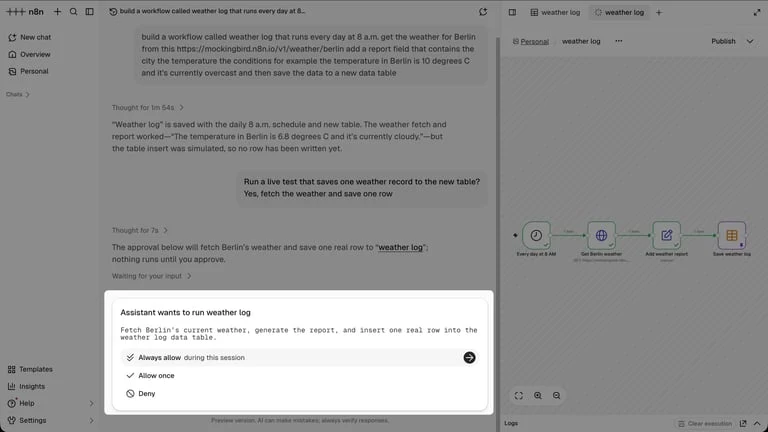
n8n is a workflow platform with a visual editor and code steps, available hosted or self-hosted. Teams use it for intake, enrichment, routing and CRM writes when they want to own the logic. We didn't route with n8n; our own routing ran as scripts on cron jobs, and the silent failures above are the risk any self-built router carries. If you go this way, store the event key so a replayed webhook doesn't create a second lead, and alert when a job stops writing. See the plans and billing record and n8n cloud vs self-hosted.
Test cases before going live
- A contact at a customer using a second domain.
- A visitor from a company with an open deal.
- A competitor whose name matches an unrelated company.
- A duplicate form submission.
- An event that arrives while the suppression source is down.
- A reply on one channel while the other channel is mid-sequence.
- An owner who is on leave or has disconnected their calendar.
For the visitor side of this, see website visitor identification software.
Questions buyers ask
What is the best lead routing software?
Chili Piper or RevenueHero for inbound teams that want routing and meeting booking together, LeanData for complex Salesforce territories, and HubSpot workflows for simple owner and round-robin rules. Domain matching and suppression need building in front of any of them.
What order should lead routing rules run in?
Ours: dedupe the event, resolve the account, check suppression, then existing customer owner, open deal owner, territory owner, and round-robin last. Running suppression before ownership kept opted-out and competitor contacts out.
How do you stop routing existing customers into outbound?
Match on every domain the account uses. An exact domain match missed www and subsidiary domains for us, and two customers nearly got cold email. 4% of our identified visitors were customers or open deals.
Do I need a dedicated lead routing tool or is my CRM enough?
A CRM workflow is enough for existing-owner-else-round-robin with manual booking. A dedicated tool pays off when you want qualify, route and book in one step, overlapping territories, or an audit trail per assignment.
How many leads should a pre-send gate remove?
Ours removed 27% of about 550 contacts on one run in August 2026, mostly mailboxes hosted outside the US, mismatched email domains and invalid addresses.